← Назад към блога
Windows commands
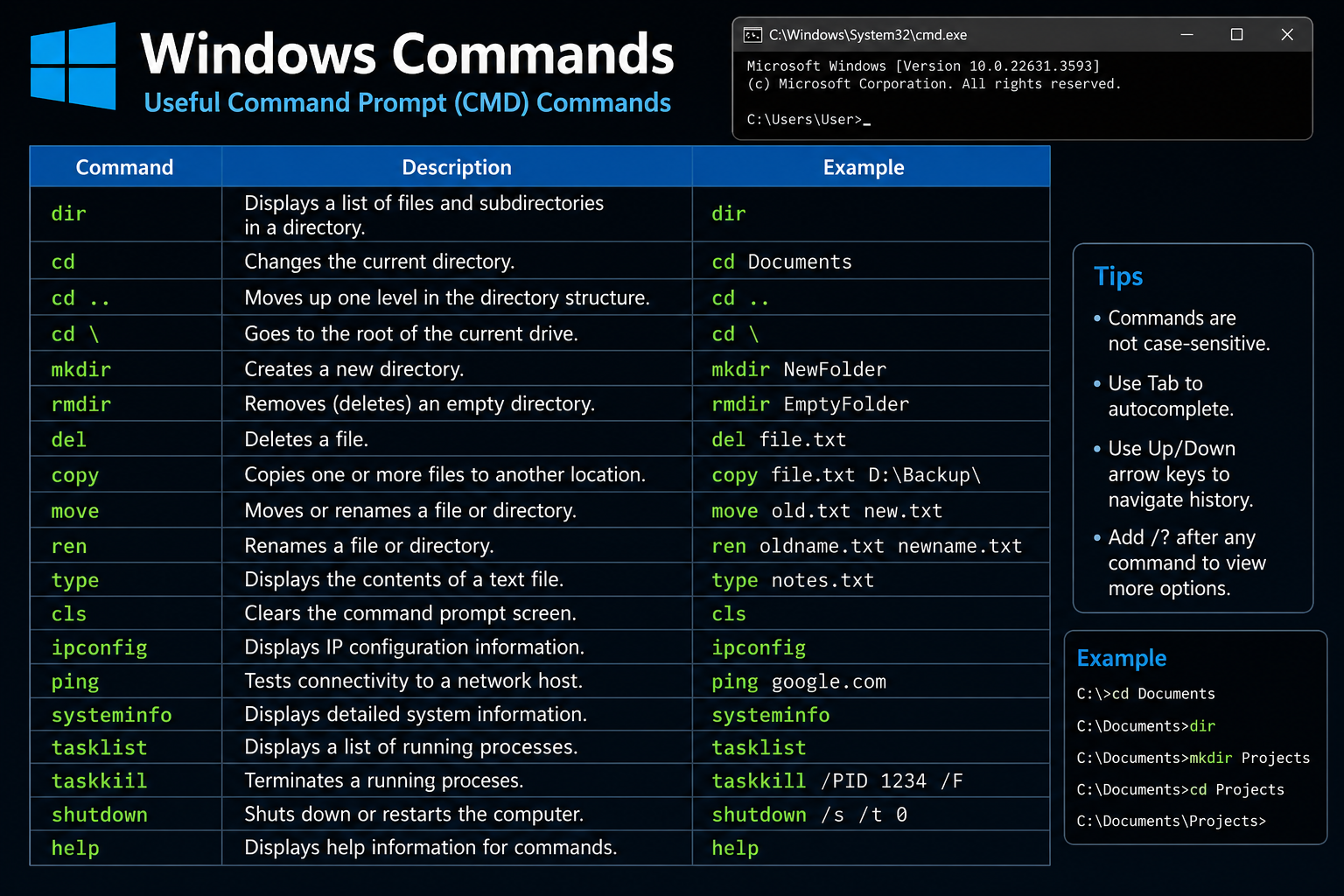 Most Windows executables can be started from Command Prompt as long as they are in the system `PATH` or you specify their full path. Below are many of the most useful built-in commands and GUI tools you can launch directly from `cmd`. | Command | Purpose | | ------------------ | --------------------------------------------------------- | | `explorer` | Open File Explorer or browse to a folder | | `cmd` | Open a new Command Prompt | | `powershell` | Start Windows PowerShell | | `pwsh` | Start PowerShell 7 (if installed) | | `notepad` | Text editor | | `write` | WordPad (older Windows versions) | | `mspaint` | Paint | | `calc` | Calculator | | `snippingtool` | Screenshot tool | | `osk` | On-Screen Keyboard | | `magnify` | Magnifier | | `narrator` | Screen reader | | `charmap` | Character Map | | `winver` | Windows version dialog | | `dxdiag` | DirectX diagnostics | | `msinfo32` | System information | | `control` | Control Panel | | `optionalfeatures` | Windows Features dialog | | `appwiz.cpl` | Programs and Features | | `sysdm.cpl` | System Properties | | `desk.cpl` | Display settings (legacy) | | `timedate.cpl` | Date & Time settings | | `main.cpl` | Mouse settings | | `mmsys.cpl` | Sound settings | | `ncpa.cpl` | Network adapters | | `firewall.cpl` | Windows Firewall | | `inetcpl.cpl` | Internet Options | | `taskmgr` | Task Manager | | `resmon` | Resource Monitor | | `perfmon` | Performance Monitor | | `eventvwr` | Event Viewer | | `compmgmt.msc` | Computer Management | | `devmgmt.msc` | Device Manager | | `diskmgmt.msc` | Disk Management | | `services.msc` | Services manager | | `taskschd.msc` | Task Scheduler | | `gpedit.msc` | Group Policy Editor (Pro/Enterprise) | | `secpol.msc` | Local Security Policy | | `lusrmgr.msc` | Local Users and Groups | | `fsmgmt.msc` | Shared Folders | | `certmgr.msc` | User certificates | | `regedit` | Registry Editor | | `regedt32` | Registry Editor alias | | `msconfig` | System Configuration | | `shutdown` | Shut down, restart, log off | | `logoff` | Log off current user | | `tasklist` | List running processes | | `taskkill` | End processes | | `whoami` | Show current user | | `hostname` | Show computer name | | `systeminfo` | Detailed OS information | | `ipconfig` | Network configuration | | `ping` | Test network connectivity | | `tracert` | Trace network route | | `pathping` | Advanced route diagnostics | | `netstat` | Network connections | | `arp` | ARP cache | | `route` | Routing table | | `nslookup` | DNS lookup | | `netsh` | Configure networking | | `net` | Manage users, shares, services | | `curl` | HTTP client | | `ftp` | FTP client | | `telnet` | Telnet client (if installed) | | `ssh` | OpenSSH client (Windows 10/11) | | `robocopy` | Advanced file copy | | `xcopy` | Extended copy | | `tree` | Display directory tree | | `attrib` | Change file attributes | | `where` | Locate executables | | `find` | Search text | | `findstr` | Advanced text search | | `sort` | Sort text | | `fc` | Compare files | | `comp` | Compare binary files | | `more` | Paginate output | | `cipher` | EFS encryption management | | `takeown` | Take ownership of files | | `icacls` | Manage file permissions | | `sfc` | System File Checker | | `dism` | Repair Windows images | | `chkdsk` | Check disk for errors | | `diskpart` | Disk partition management | | `format` | Format a drive | | `label` | Change drive label | | `mountvol` | Manage volume mount points | | `bcdedit` | Boot configuration | | `bootrec` | Boot repair (Recovery Environment) | | `reagentc` | Windows Recovery Environment | | `schtasks` | Manage scheduled tasks | | `gpupdate` | Refresh Group Policy | | `gpresult` | Display applied Group Policy | | `wevtutil` | Manage event logs | | `sc` | Manage Windows services | | `wmic` | WMI command-line (deprecated but present on some systems) | | `wscript` | Run VBScript/JScript with GUI | | `cscript` | Run VBScript/JScript in console | | `msiexec` | Install or remove MSI packages | | `certutil` | Certificate and encoding utility | | `timeout` | Pause for a specified time | | `clip` | Copy stdin to clipboard | ### Opening Windows Settings pages You can also launch many Settings pages: ```cmd start ms-settings: start ms-settings:display start ms-settings:network start ms-settings:windowsupdate start ms-settings:privacy start ms-settings:bluetooth start ms-settings:appsfeatures ``` ### Opening folders ```cmd explorer . explorer C:\Windows explorer %TEMP% explorer shell:startup explorer shell:downloads explorer shell:desktop ``` ### Hidden or lesser-known tools * `verifier` – Driver Verifier. * `odbcad32` – ODBC Data Source Administrator. * `iexpress` – Self-extracting package wizard. * `rasphone` – Dial-up/VPN connections. * `isoburn` – Burn ISO images. * `mrt` – Malicious Software Removal Tool. * `cleanmgr` – Disk Cleanup (legacy). * `cliconfg` – SQL Server client configuration (older systems). * `eudcedit` – Private Character Editor. Windows includes **hundreds** of launchable commands. If you're interested specifically in **commands that can execute programs or scripts** (such as `cmd`, `powershell`, `wscript`, `cscript`, `mshta`, etc.), or **GUI administration tools**, I can provide categorized lists for those as well.
